How it works
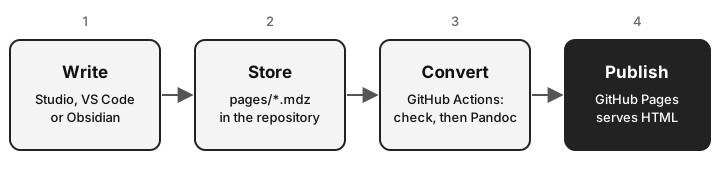
- Write. Open or create an
.mdzin MDZip Studio, VS Code or Obsidian. Paste pictures straight in: they’re stored inside the file. - Store. Save it in the repository’s
pagesfolder and push. Each page is one file, so a page and its pictures always change together. - Check and convert. On every push, a GitHub workflow runs two ready-made actions:
- setup-mdz installs the
mdzcommand-line tool, andmdz validatechecks each page. - mdzip-pandoc converts every
.mdzinpagesto a web page with Pandoc, using the template and style sheet in thesitefolder. Links between pages, likeadd-a-page.mdz, become links to the web pages.
- setup-mdz installs the
- Publish. GitHub Pages serves the result.
A pull request runs the same checks and conversion without publishing, so a broken page shows up before it goes live.
From .mdz files to a website
What you keep: the repository
Five pages, a template, a style sheet and an icon. This is everything there is to edit:
mdzip-pages-example/
├── pages/
│   ├── index.mdz              the home page
│   ├── how-it-works.mdz       this page, with its diagram inside
│   ├── features.mdz
│   ├── add-a-page.mdz
│   └── 404.mdz                shown for addresses that don't exist
├── site/
│   ├── template.html          layout, menu and the tags search engines read
│   ├── style.css
│   └── favicon.svg
└── .github/workflows/
    └── pages.yml              check, convert, publish
What gets published: the website
Each .mdz becomes a web page, its pictures come out into one images folder, and the action adds the files search engines look for:
https://mdzip-project.github.io/mdzip-pages-example/
├── index.html                 style sheet and icon built into each page
├── how-it-works.html
├── features.html
├── add-a-page.html
├── 404.html
├── images/
│   ├── 78043a06efae.svg       the diagram above, from how-it-works.mdz
│   ├── ce336d21278b.svg       the drawing in features.mdz
│   └── d8799568252d.png       this page's cover, for link previews (one per page)
├── sitemap.xml                every page's address and when it last changed
└── robots.txt                 points search engines to the sitemap
Each picture is named after its contents. A picture used on several pages is stored once, so browsers download it once, and two different pictures can’t overwrite each other even if they had the same name in their .mdz files.
Every page starts with the details search engines and link previews use. The title, description and cover picture come from the .mdz itself; the address comes from where the site is published:
<title>How it works | MDZip pages example</title>
<meta name="description" content="How a page goes from an .mdz in your editor to a web page: ...">
<link rel="canonical" href="https://mdzip-project.github.io/mdzip-pages-example/how-it-works.html">
<meta property="og:title" content="How it works">
<meta property="og:description" content="How a page goes from an .mdz in your editor to a web page: ...">
<meta property="og:image" content="https://mdzip-project.github.io/mdzip-pages-example/images/d8799568252d.png">
<meta name="twitter:card" content="summary_large_image">
The pages are static HTML: search engines read the text as it is, with no script to run first.