What a page can show
Everything on this page is in one .mdz: the text, the pictures and the diagrams. It’s written in plain Markdown, so it looks the same in your editor as it does here.
On this page: text · lists · tables · pictures · diagrams · code · quotes and notes · math
Text
Write bold, italic, both, struck out and code. Link to another page, to a heading on this page, or to a website.
A third-level heading
Headings from # to ###### make the page’s outline. Each one gets an anchor, so you can link straight to it, like the links at the top of this page.
Lists
Bullets:
- Pages are
.mdzfiles - Each holds its Markdown and its pictures
- Nested lists work too
- As deep as you need
Numbered steps:
- Write the page
- Push it
- Read it on the web
A task list:
Tables
| Feature | In your editor | On the website | Notes |
|---|---|---|---|
| Headings and lists | Yes | Yes | Plain Markdown |
| Tables | Yes | Yes | Columns can align left, center or right |
| Pictures | Yes | Yes | Stored inside the .mdz |
| Mermaid diagrams | Most editors | Yes | Drawn in the browser |
Pictures
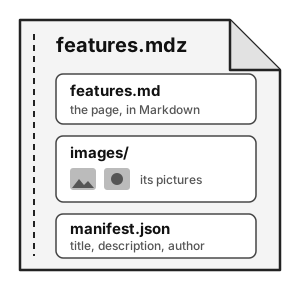
Pictures are stored inside the .mdz, so they can’t go missing. This drawing shows what’s inside this page’s file.
On a wide screen it sits to the right of the text, because the page uses the same HTML that MDZip Studio writes when you align a picture: <img src="..." align="right">. On a phone it sits on its own line instead.
A picture can also have the page to itself, with plain Markdown: .
Diagrams
A diagram can be a picture, like the flow on How it works, drawn in any tool that saves SVG, such as draw.io.
Or it can be text. This is a Mermaid diagram, written as a code block marked mermaid, and drawn in your browser:
flowchart LR
    A[Write a page] --> B[Save the .mdz]
    B --> C{Push}
    C -->|pull request| D[Check and convert]
    C -->|main branch| E[Check, convert and publish]
    E --> F((Website))
Code
Code blocks are colored by language:
from pathlib import Path

for page in sorted(Path("pages").glob("*.mdz")):
    print(f"Publishing {page.stem}.html")
- uses: mdzip-project/mdzip-pandoc@v0
with:
input: pages
output: _siteQuotes and notes
A quote, or a note set apart from the text.
It can run over several paragraphs.
A footnote goes at the end of the page, with a link back.1
A line made of three dashes, like the one above, divides the page.
Math
Formulas are written between dollar signs. The area of a circle is , and on a line of its own:
This is the footnote. The arrow takes you back to where you were.↩︎